Subaru Key Fob Battery Replacement: The Ultimate DIY Guide
You’re running late for work, your hands are full of groceries, or maybe you’re just trying to get home after a long day. You press the unlock button on your remote, and… nothing happens. You press it again. Still nothing. Panic sets in. Is the car battery dead? Is the electrical system frying?
Most of the time, the answer is much simpler: your key fob battery is dead.
Your Subaru key fob is your primary line of access and security. We often take it for granted until the moment it stops working. Fortunately, getting your remote back in action doesn’t require a costly trip to the dealership or hours of waiting in a service lounge. Replacing the battery is a quick, inexpensive DIY task that you can finish in under five minutes.
This guide walks you through everything you need to know to get your Subaru key fob working again, regardless of whether you drive a brand-new Outback or an older Impreza.
Signs Your Subaru Key Fob Battery is Low
Batteries rarely fail without warning. Your key fob will usually give you several subtle hints that it is losing power weeks before it dies completely. Paying attention to these signs can save you from getting stranded in a parking lot.
The most common indicators include:
- Decreased Signal Range: You might notice you have to stand significantly closer to your vehicle for the buttons to register. If you used to be able to unlock your car from your front porch but now have to be right next to the driver’s door, the battery is fading.
- Intermittent Functionality: Sometimes it works, sometimes it doesn’t. If you find yourself pressing the unlock button two or three times to get a response, the voltage is likely dropping.
- Delayed Response: You press the button, and there is a noticeable lag before the hazard lights flash or the locks click.
- Dim LED Indicator: Many Subaru fobs have a small red LED light that flashes when you press a button. If this light appears dim or doesn’t flash at all, your battery is critically low.
Diagnosing this issue is straightforward. Unlike a complex vehicle alert—such as a Mazda battery management system malfunction that might appear on a different make of car and requires specialized diagnostic tools—a lagging Subaru key fob is almost always fixed with a simple battery swap.
Identifying Your Key Fob Model and Battery Type
Subaru has used a few different key fob designs over the last two decades. Before you pry anything open, you need to know which battery to buy. Using the wrong size can damage the internal contacts or simply fail to power the remote.
Here is how to identify your specific fob and the battery it needs:
Newer Rectangular Fobs (2015 – Present)
These are the most common fobs for modern Subarus equipped with “Push-to-Start” technology. They are rectangular, sleek, and conceal a mechanical emergency key inside the casing.
- Battery Required: CR2032
Teardrop Fobs (2005 – 2015)
These fobs have a distinct teardrop shape with the lock/unlock buttons located directly on the face of the plastic remote. They are typically used with vehicles that still require you to insert a physical key into the ignition.
- Battery Required: CR2025
Exposed Metal Key Fobs (Older Models)
On older models, the remote buttons are integrated directly into the head of the physical metal key. There is no separate “fob” unit; the key itself houses the electronics.
- Battery Required: CR1620
Pro Tip: When buying a replacement, stick to reputable brands like Energizer or Panasonic. Generic batteries often have inconsistent voltage output, which can lead to shorter lifespans or spotty performance.
Tools You Will Need
You don’t need a mechanic’s toolbox to do this job. In fact, you likely have everything you need in your junk drawer right now.
- Flathead Screwdriver: A small precision screwdriver works best. In a pinch, a butter knife or even a thin coin can work for some models, but be careful not to strip the plastic.
- Replacement Battery: Make sure you have the correct size (CR2032, CR2025, or CR1620) ready to go.
- Soft Cloth: This is optional but recommended. Wrapping your screwdriver tip in a thin cloth helps prevent scratches on the plastic casing when you pry it open.
Step-by-Step Guide: How to Change the Subaru Key Fob Battery
Once you have your battery and tools, find a clean, well-lit surface to work on. The internal components are small, and you don’t want to lose any pieces.
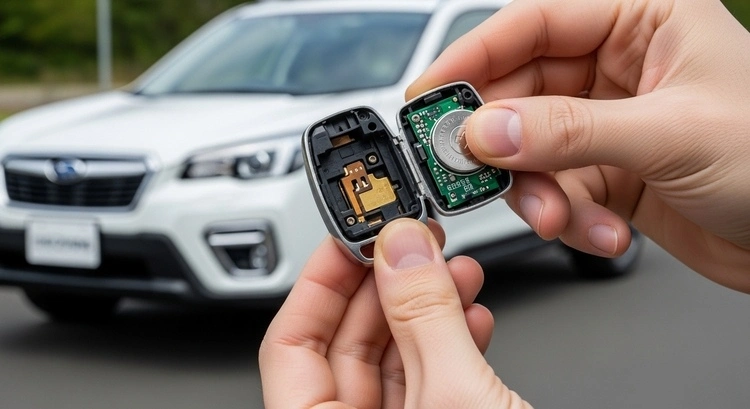
A. Replacing the Battery in Newer Fobs (Push-to-Start)
This process applies to most late-model vehicles like the Forester, Crosstrek, and Outback.
1. Remove the Mechanical Key Flip your key fob over and look for a small silver square or release tab on the back. Press this tab down with your fingernail. While holding it down, pull on the silver ring at the top of the fob. The mechanical emergency key will slide out.
2. Open the Housing Look closely at the gap where the emergency key used to be. You will see a small seam or notch separating the front and back halves of the fob casing. Insert the tip of your flathead screwdriver into this seam. Gently twist the screwdriver—do not pry aggressively. The casing should pop open with a distinct click.
3. Swap the Battery Inside, you will see the round CR2032 battery. Take note of how it is seated; the positive (+) side should be facing up. Use your screwdriver to gently lift the old battery out. Press the new battery into place, ensuring it sits flat and secure.
4. Reassemble Line up the back cover with the front of the fob. Press them together firmly until you hear them snap shut. Finally, slide the mechanical key back into its slot until it clicks into place.
B. Replacing the Battery in Older Fobs (Teardrop)
If you drive a Subaru from the mid-2000s or early 2010s, you likely have the “teardrop” style remote. These fobs are separate from the key itself and have a distinct, rounded shape.
1. Locate the Pry Point Look closely at the seam where the two halves of the plastic case meet. You will find a small indentation or notch, usually at the top or bottom of the fob.
2. Open the Fob Insert your flathead screwdriver into this notch. twist the screwdriver gently. You aren’t trying to slice it open; you just want to pop the clips that hold the case together. The case should separate into two pieces.
3. Replace the Battery Inside, you will find the CR2025 battery. Note its orientation—the positive side is usually facing up. Carefully remove the old battery. If it’s stuck, use the corner of your screwdriver to nudge it out. Place the new battery in the slot, ensuring it sits flat.
4. Snap Shut Align the front and back covers carefully. Squeeze them together until you hear a solid click. Test the buttons immediately to ensure the light flashes.
C. Replacing the Battery in Metal Key Fobs
For many older models, the buttons are built directly into the head of the metal key.
1. Open the Casing Some of these keys have a small screw on the back case. If yours does, use a tiny Phillips head screwdriver to remove it. If there is no screw, look for a pry tab on the side of the key head and use your flathead screwdriver to pop it open.
2. Remove the Module Once the case is open, you will see a small rectangular “button module” inside. Take this unit out of the key head.
3. Battery Swap The battery is inside this module. You may need to unclip small plastic tabs to open the module itself. Swap out the old CR1620 battery for a new one, ensuring the positive side is correct.
4. Final Steps Close the module, place it back into the key head, and snap (or screw) the casing back together.
Troubleshooting: Potential Issues After Battery Replacement
You changed the battery, snapped the case shut, and… nothing. The car still won’t unlock. Don’t panic; the remote likely isn’t broken.
Check the Polarity
This is the most common mistake. Open the fob again and double-check that the battery is facing the right way. The positive (+) side usually faces up, but check the markings on the plastic slot to be sure.
Inspect for Corrosion
If the old battery leaked or the fob got wet, you might see white or green crust on the metal contacts. Clean this off gently with a cotton swab and a little rubbing alcohol.
Check Button Alignment
Sometimes the rubber buttons inside the case slip out of place during reassembly. Ensure the rubber pad is seated correctly over the circuit board before closing the case.
Emergency Guide: How to Start Your Car with a Dead Key Fob
If your battery dies completely while you are out, you are not stuck. Subaru engineers designed a fail-safe for this exact scenario.
Accessing the Car
If your remote buttons won’t unlock the doors, you need to use the physical key.
- For Push-to-Start Fobs: Release the emergency key from the back of the fob (as described in the replacement steps) and use it in the driver’s door lock cylinder.
- Note: This may trigger the car alarm. Don’t worry—starting the car will silence it.
Starting the Engine
Your car has a backup immobilizer reader built into the Start/Stop button.
- Press your foot on the brake pedal.
- Hold the Subaru logo on your dead key fob directly against the Start/Stop button.
- Press the button. The car should recognize the chip inside the fob and start normally.
Battery Lifespan and Maintenance Tips
A standard key fob battery will typically last between 1 to 2 years. This depends heavily on how often you use it and where you store it.
It’s important to remember that these are small, consumable power cells. While the high-voltage system in a modern EV is designed for the long haul—experts say an electric car battery will probably last 10 to 20 years before it will need a replacement—the tiny coin cell in your pocket is a different story. It works hard every day transmitting signals and requires frequent changing.
How to Extend Battery Life
- Don’t “Wake” the Car: If you store your keys on a hook right next to your driveway or garage, the fob and the car may constantly communicate, draining the battery. Store keys at least 15 feet away from the vehicle.
- Avoid Extreme Temperatures: Don’t leave your keys on the dashboard in summer or in a freezing car overnight. Extreme temps kill small batteries quickly.
When to Consult a Professional
Most of the time, a new battery fixes everything. However, there are times when you might need expert help.
- Water Damage: If the fob went through the washing machine, a battery change might not save it. The internal circuit board may be fried.
- Broken Contacts: If the metal clips that hold the battery are snapped off, the fob will need to be replaced.
- Reprogramming Issues: In rare cases, a fob can lose its pairing code with the car. If a new battery and the emergency start method don’t work, you may need a dealership or an automotive locksmith to reprogram the remote.
FAQs
Nothing dangerous will happen. Your car will not shut off. The key fob is only needed to start the car. Once the engine is running, you can drive to your destination safely. You just won’t be able to lock or restart the car until you fix the issue.
No. Subaru key fobs are designed to retain their programming code even when the battery is removed. Unless the fob is broken, it should work immediately after the swap.
You can, but it isn’t recommended. Generic coin-cell batteries often have lower capacity and may leak, which can ruin your expensive key fob. Stick to major brands like Duracell, Energizer, or Panasonic.
Conclusion
Replacing your Subaru key fob battery is one of the easiest and most satisfying DIY car repairs you can do. It costs less than a cup of coffee and takes only a few minutes. By recognizing the early signs of a low battery and knowing how to swap it out, you ensure that you never get stranded with a car that won’t unlock.
Don’t wait for the remote to fail completely. If you have to press the button twice to unlock your door today, buy a battery on your way home. Your future self will thank you.